![Intuitive logo RGB-1.png]](https://help.intuitivebusinessintelligence.com/hs-fs/hubfs/Intuitive%20logo%20RGB-1.png?height=40&name=Intuitive%20logo%20RGB-1.png)
With the Datafeeds retrieving data from the Connections’ View, this sets the final data-layer scene for the Dataset.
The Dataset is largely a selection of the columns listed directly from each respective Datafeed.
Typically, all attributes are copied over, and any measures (i.e. numbers that we need to show) are a mixture of sums, counts, and general percentages.
The Datasets are also treated 1-1 with Datafeeds. Meaning, that for every Dataset there’s a unique Datafeed supplying data. The below illustrates this:
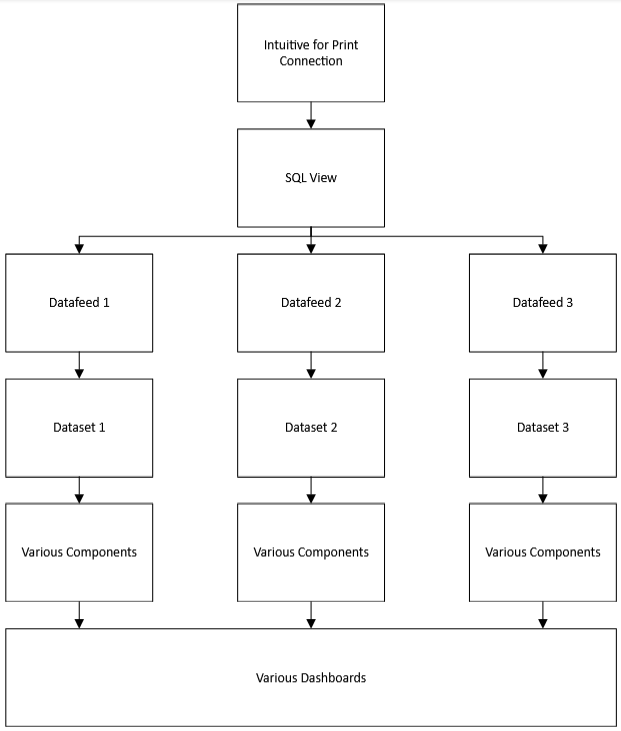
The general design of having these Datasets and Datafeeds is to efficiently show as much information as possible, but to keep performance to a performant level. It’s an important balance to maintain, as data analysis requires detail to form its highlights, but users must have a performant experience in order to get there.
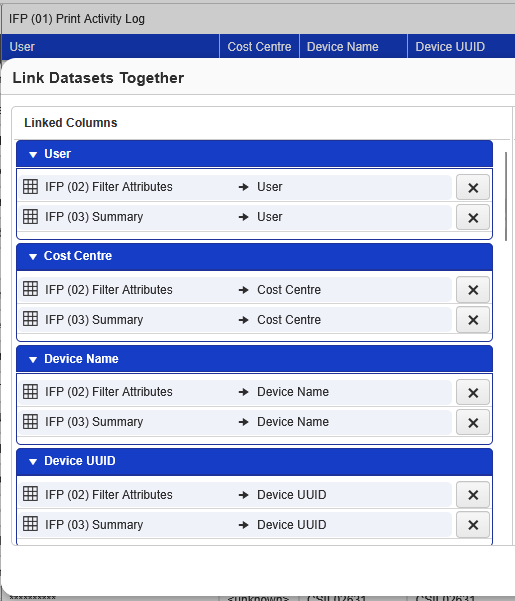
Each of the datasets are linked to each other on their shared attributes. One example being the “Cost Centre”. That is linked to other datasets containing their own “Cost Centre”, as the eventual dashboards can link and filter each other. Linking only occurs when there is a 1-1 match of that attribute. Meaning, you do not link attributes on one attribute that has no physical mirroring to another, i.e. comparing apples and oranges.
One key change over the previous versions of Intuitive for Print Management, is that we handle cost prefixes of the currency symbol differently. Should you explore the datasets, you will notice that costs use the parameter {CDF}. This parameter is a variable that is defined by the “Custom Data Field” in the customers’ organisation.
This has been added to streamline the process of supporting different currencies, whilst maintaining single languages. E.g. reducing the need for multiple English dashboard versions in pound sterling, dollars and euros. Changing the currency symbol is a straightforward process, and will be detailed later in a separate topic.